Showing posts with label Software. Show all posts

Friday, July 24, 2009

What's a Vista business user to do?The Scarlet V

Windows 7 has been released to manufacturing and is obviously the operating system that Microsoft and its partners will be pushing for the next two-plus years. If you’re one of those business users who is in the midst of deploying Vista, what should you do?

But in May, around the time Microsoft delivered the near-final Release Candidate (RC) test build of Windows 7, Windows execs stopped saying much at all about Vista. In fact, it was like pulling teeth to get them to talk about Vista Service Pack (SP) 2, in terms of discussing features, fixes and/or availability. At the company’s recent Worldwide Partner Conference, the message was clear: As of May, any marketing campaigns that had been using the word “Vista” should be switched to refer to “Windows.”

Mike Angiulo, General Manager of Microsoft’s Planning and PC Ecosystem team, said Microsoft is not casting off its Vista users.

“We are not abandoning our existing Vista customers,” Angiulo said. “A three-year cycle is the right amount of time” for the delivery of a new client operating system release to users, and that’s just about how long it will be by the time it makes Windows 7 generally available, he said.

“A year ago, 87 percent of our commercial customers were on XP. Many are looking to skip a generation and go straight to Vista, Windows 7″ said Jim Ginger, Global Lead of Dell’s End User Services Computing Practice. (Sorry: my mistake on that one… MJF)

But like Microsoft, Dell is insisting that the Windows 7 push won’t mean that Vista users get left behind.

“They can continue with Vista or start rolling out (Windows) 7. The two are similar enough that they will work harmoniously together” so having a mixed Vista/Windows 7 environment shouldn’t be an issue, he said.

The Air Force, as of April of this year, had deployed 90,000 Vista laptops and desktops, according to one of my sources who has knowledge of the details of the contract. The Air Force evaluated and tested Vista between December 2006 to June 2008 and initially deployed the operating system among select bases to about 10,000 users before going further. The Air Force moved to Vista because of the security assurances it offered over XP, according to my source.

Tuesday, June 23, 2009

Apple Faithful: Arrogance Is Not a Virtue, and Why I Will Never Buy a Mac

Let us once again to the lightning flash at the end of November of 1981. Ronald Reagan was on the verge of ending its first year in power. 13th birthday of my country, as part of my bar mitzvah money, and they should buy a new Apple computer + Second, the beauty of a double Floppies, 48k of RAM, and column 80 CP / M cards zghljfj CRT monitor green, 300 Baud Hayes Smart modem.

At this moment, the state of the art machine, and we have chosen because the children in my upper middle class suburb of Great neck, New York, and they were all, as if the local libraries. I have several years of using this system, and the accumulation of huge quantities of software by "commercial" (We do not have the name of "piracy" when I went to their homes and copied Floppies play with locks and cells and even dragons and later traded to the Apple of the Independent Inquiry Committee, "the Agreement" and variations the previous unit.

Apple] [series of the distinction of personal computers, Steve Wozniak) the real start of the technical brains behind Apple Computer Inc.) is responsible for the engineering. After a plane crash near death in February of 1981, Wozniak spent time recovering from the loss of memory, and a university degree. He did not return to Apple for another two years, but by that time was completely out of the workshop on the development of products and businesses in largely symbolic and catalytic.

In 1984, Apple Macintosh. By that time, my interests have gravitated towards the PC XT IBM and Microsoft, such as Tandon Doss reproduction and very advanced, and my father who bought his dental practice to run, and you want to know that today's software companies currently used, such as Lotus 123, WordStar, dBase, and Harvard University drawings. My Apple of the Independent Inquiry Committee, and was still useful, as reflected in the people. 1984 is the year I came in contact with the first full-FANBOY, first cousin, Andrew.

I remember clearly the moment. I was 15 or 16 years, and was visiting my aunt and uncle at his home in New Rochelle, New York, and Andrew, and since several years my senior, and the pride of the new Mac released only recently.

Andrew, on time, in the second or third year of college, I had advice to his room to show me the machine, in an attempt to appeal to my colleague geekishness. Which was very small, and integrated with the central processing unit and control of small, had a graphical user interface, state-of-the-art at that time. It 128K memory, as opposed to the 384K jack on your computer. But with the word processing program, full of writing and drawing a simple paint program Mac.

Monday, June 22, 2009

4 Ways to Avoid an Outlook 'Oops'

Have you ever accidentally sent a sensitive e - mail to the wrong recipient? No, congratulations, if so, the other 99 per cent of the workforce in welcome.

I send out an email about the incredible, as a reporter I often low because non-disclosure agreement, but even then sometimes I still am careful mistake. That's why I'm glad to read a post in Steve Levy's proposed four ways to mail in Outlook "Oops" to reduce the e secret.

I Outlook, I have a beautiful, common sense, but two of them new tricks - and they all deserve to share.

1. To get rid of Unhelpful suggestions. How do you when you name or email address in the "To" field to start typing in the address, some suggest autocompletions Outlook? This is most of the time, except when you click "enter" too soon and my email in January to help stop the flies, the customer, rather than Jane, his best friend.

Autosuggestion to delete the Outlook, a new E-mail to get opened. The "for" box type in the first few letters of the name until you get a list of proposals. An arrow key that you use to remove, and press Delete to select. However, Levy warns, of course, Outlook apparently does not record until then deleted the "To" field you type in at least one other name before the name to cancel them.

2. When the name of E-mail to search for did not use. This is a nice feature, but if you accidentally enter your name in the email you send out will be relevant. If you, a name only to find) a new E (empty building - it needs to match. Then remove it.

3. Automatically when sending mail was delayed. Here is a good way: you have a rule that automatically Outlook can buy some time. If, I, like you sometimes feel that "this file that says something like sending your email (It is also useful, guys!" And then forget to include anything.) Go to Tools -> Terms and Warning - -> New Rule -> check the message -> After the pass () to run the first rule of empty -> postponed to the number of minutes (I) -> next, and then in September, use 5 ... Do you want any kind.

4. Think before you type. Your boss (or co-workers, or customers) are not E-mail. Colors, or do not use of sexist language. As Levi says, this sentence does not begin with, "this, but ...." May be illegal

Oh, and not to work, "I think I" E-mail, in fact, to ensure you, really "want to hit Send your mail with Google eye examination is not written, do not forget."

10 cool tools in Windows 7

1: Action Center

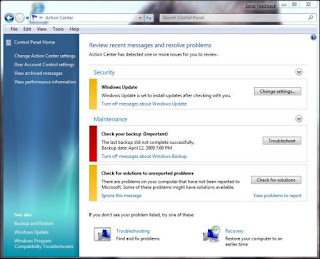
The central administration is the name of the game today, and Windows 7, and gives you shopping in one place where you can go in addressing the issues of security, troubleshooting and recovery, but to search for all applications. It combines all the easy-to-use Control Panel Applet and, if maintaining the security of information, you can view the data on their effectiveness, to change the settings in the companion more.

2: the problem of registration steps

One of the finest and Windows 7 steps to the problem of registration (SSR) - especially for those of us who provide technical support for users of Windows. Whatever they tried, and users often problems in the accurate description of the problem, and found that the actions taken or before or after. Of course, it is not possible to provide assistance after an accident in such cases. But you can not always be in contact with the user's computer in real time. It is when the SSR.
This is, in fact, the type of screen capture programs that record every activity - Keystrokes, mouse clicks, and so on - and stores the sequence of events MHTML page document every step of the user is taking a snapshot of the screen. PSR psr.exe begin typing in the search box or the Start menu command the International Organization for Standardization prompt.3 burner

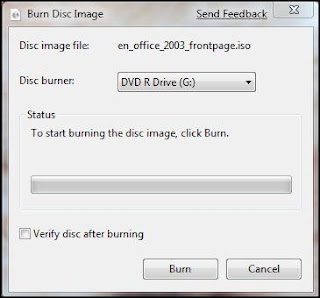
ISO image of the type of archive file, which is often used to distribute programs. Microsoft Windows 7 to resolve what is a list of the wishes of many users for a long time: You do not have to download and install a third party to the International Organization for Standardization burning the file to disk.

This is a simple process: Once the download. International Organization for Standardization on the hard disk, and then click only twice, and Windows 7 will open the dialog box to save images to disk box.
4: biometric device management

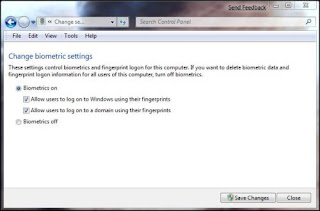
In previous versions of Windows and biometric authentication, and management of biometric devices (fingerprint sensors) required third party software that may or may not be able to integrate well with the operating system. Now it is built in Windows 7 are included in the program and Windows biometrics, which provides the API developers can use to create applications of biometrics. Makers fingerprint sensors, such as AuthenTec and upeklo, and worked with Microsoft to develop. Biometric devices, which are managed through the control panel applet.5: credential management

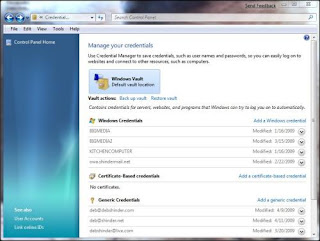
Credentials of another new feature of Windows and the 7th in a manner similar to a password management feature of Vista, User Accounts Applet, but it is more complicated than that. You can manage the credentials and Windows PCs on different incomes, and to testify on the basis of credentials, and other types of credentials (e-mail accounts, Internet, etc.) .. These are stored, by default, in Windows Vault.
6: Display the Windows Mobility Center

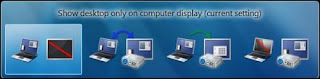
If you give the parties and presentations, which will receive a new tool for Windows 7 that makes it easier for you to show Windows 7 on the desktop of a laptop display. Once the pressure on the Windows logo key + R and you'll see a pop-up window box.
7: Text color calibration and control

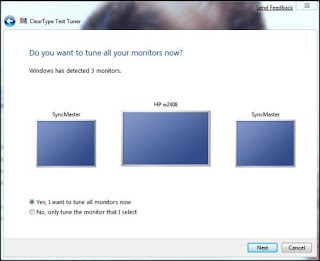
The computer does not work, but the screen is what you will see every day. If it does not look good and get more from the experience of your computer, and can actually strain your eyes. Windows 7 includes two of the main tools to adjust to fit your screen preferences.
8: the reform of the system disk

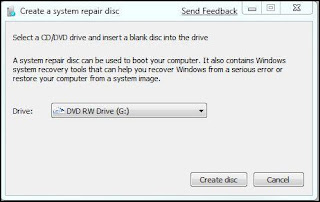
With Windows Vista SP1 Betas include the new feature makes it easy to create a CD-friendly reform of the graphical interface, but they canceled the final release of SP1. Windows 7 and the restoration of function. Simply click Start, and type of repair system in the search box. Click on the establishment of the reform of the CD. This opens the dialogue box.
9: improving backup facilities

Of course, previous versions of Windows, including support facilities, but this tool to a large extent and 7th Windows Vista support the program easy to use, but not very flexible. Windows 7 gives you more granular control over what you want of support.

You can use the backup and restore the Applet from the control panel, and backup, or write in the search box on the Start menu. You can make a backup of the files on the local hard disk and removable disk, DVD, or other computer networks. (You may need to provide credentials to access the Web site.) Now you can choose to support the individual libraries or folders.
10: PowerShell v2

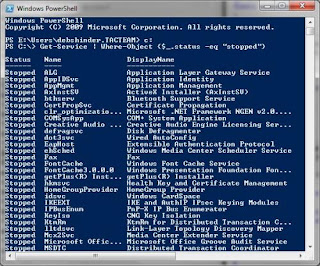
Windows PowerShell (Figure P) is a command line interface shell and scenario tool simplifies Windows administrators to automate tasks using the cmdlets which teams carry out their tasks, as well as text, which consists of a series of cmdlets complex, multi-step tasks.